
FabFilter vs FL Studio Stock Plugins: Are They Worth the Money?
Discover if FabFilter plugins are worth the investment over FL Studio's stock plugins. Honest comparison of Pro-Q 3, Pro-C 2, and more vs Fruity Parametric EQ and native tools.
You've been mixing with FL Studio's stock plugins for months, maybe years. Your beats sound decent, but then you hear another producer's mix and wonder: "How did they get that clarity?" Scroll through their Instagram and you'll probably see FabFilter's sleek interfaces plastered across their stories.
At $169 for Pro-Q 3 alone and over $800 for the FabFilter Total Bundle, these plugins aren't impulse purchases. Meanwhile, FL Studio All Plugins Edition comes loaded with Fruity Parametric EQ 2, Maximus, and dozens of other tools that technically do the same job.
So here's the real question: are you buying better sound, or just prettier graphics? Let's cut through the hype and figure out if FabFilter plugins actually improve your mixes or if FL Studio's stock arsenal is enough to get you where you need to be.
The Honest Truth About Stock Plugins
FL Studio's stock plugins get unfairly dismissed by gear snobs who equate expensive with professional. The reality? FL Studio ships with genuinely capable mixing tools that power countless chart-topping productions.
Fruity Parametric EQ 2 is a surgical 7-band parametric EQ that handles 95% of mixing tasks without breaking a sweat. Maximus is a multiband compressor that rivals plugins costing $200+. Fruity Limiter has saved more mixes than most producers want to admit.
The workflow is functional but dated. Resizing windows feels clunky, the interfaces look like they're from 2010, and certain features require workarounds that slow down creative momentum. But none of this stops you from making professional-sounding music.
The real limitation isn't sound quality - it's workflow efficiency. You can absolutely achieve radio-ready mixes with stock FL Studio plugins. The question is how long it takes and how many creative decisions you second-guess along the way.
What You Actually Get with FabFilter
FabFilter didn't become the industry standard by accident. These plugins solve specific workflow problems that stock tools overlook, and once you experience the difference, it's hard to go back.
FabFilter Pro-Q 3: The EQ That Changed Everything
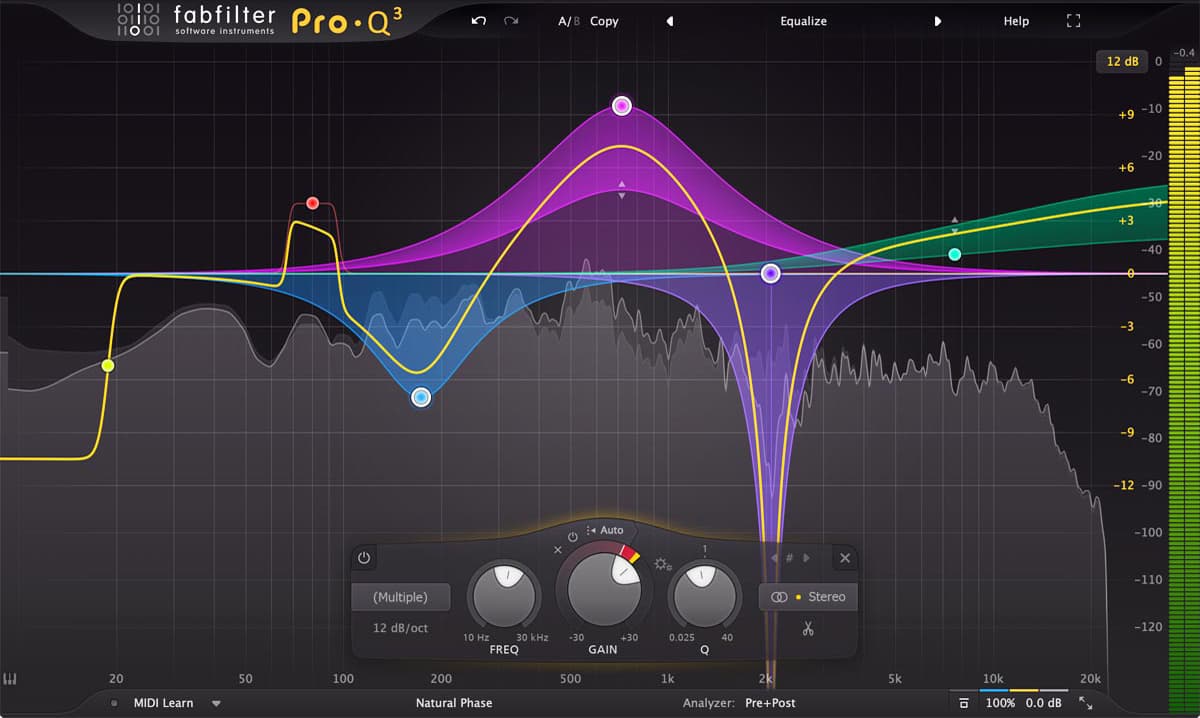
Pro-Q 3 isn't just another EQ - it's a mixing microscope that shows you exactly what's happening in your frequency spectrum while letting you fix problems with surgical precision.
The spectrum analyzer updates in real-time with zero latency, meaning you see frequency changes as you make them. The dynamic EQ feature lets bands respond to threshold levels, essentially combining EQ and compression into one tool. Mid/side processing is built-in and actually intuitive to use.
Compare this to Fruity Parametric EQ 2: functional, accurate, but you're flying blind without external spectrum analysis. Making subtle cuts requires zooming in and manually typing values. Dynamic EQ? You'll need to route to Maximus and hope you get it right.
Where Pro-Q 3 wins: Workflow speed, visual feedback, dynamic EQ, natural-sounding surgical cuts
Where FL Studio holds up: Basic EQ tasks, broad strokes tone shaping, learning fundamentals
FabFilter Pro-C 2: Compression That Makes Sense
Pro-C 2 takes compression - one of the most confusing concepts for beginners - and makes it visual and musical. You see exactly how the compressor is responding to your audio with real-time gain reduction displays that actually help you learn.
The interface exposes every parameter clearly without overwhelming you. Eight different compression styles (Vocal, Mastering, Bus, Punch, etc.) give you starting points that actually work. The side-chain filtering is sophisticated enough for ducking kicks without destroying your bass tone.
FL Studio's stock compressors (Fruity Limiter, Fruity Compressor) work fine but require more guesswork. The interfaces don't show you what's happening as clearly, and dialing in settings often involves trial and error that breaks your creative flow.
Real-world difference: With Pro-C 2, you'll nail your vocal compression in 2 minutes. With stock tools, you might spend 10 minutes tweaking, bypassing, and comparing before you're confident it's right.
FabFilter Pro-L 2: Mastering-Grade Limiting
Pro-L 2 is overkill for most bedroom producers, but if you're serious about loudness and clarity in your final masters, nothing in FL Studio's stock arsenal competes at this level.
The true peak limiting prevents clipping on streaming platforms. Four different limiting algorithms let you choose between transparency and punch. The real-time level meters show you exactly how your master translates to different playback systems.
Fruity Limiter can get your tracks loud, but it lacks the sophistication to maintain clarity at competitive loudness levels. You'll hit that wall where pushing harder just makes everything sound worse.
Who needs this: Producers releasing music professionally who need maximum loudness without sacrificing quality Who doesn't: Beginners still learning basic mixing concepts
The $800 Question: Total Bundle Worth It?
FabFilter's Total Bundle includes Pro-Q 3, Pro-C 2, Pro-L 2, Pro-MB (multiband dynamics), Pro-DS (de-esser), Pro-R (reverb), Pro-G (gate), Saturn 2 (distortion/saturation), Timeless 3 (delay), Volcano 3 (filter), and Twin 3 (synth).
At full price ($849), it's a significant investment. But here's the reality check most reviews won't tell you: you don't need the entire bundle.
The essential three: Pro-Q 3, Pro-C 2, and Pro-L 2 cover 90% of what separates amateur mixes from professional ones. These three alone cost $507 at full price.
Watch for sales: FabFilter runs sales 2-3 times per year with 25-40% off. Black Friday, summer sales, and occasional flash sales make the bundle around $500-600. Never pay full price.
Educational discount: If you're a student or teacher, FabFilter offers 50% off through their education program. This makes the entire bundle $424.50 - absolutely worth it at that price.
When FL Studio Stock Plugins Are Enough
Let's be clear: you don't need FabFilter to make professional music. If you're in any of these situations, stick with stock plugins and invest your money elsewhere:
You're still learning the fundamentals. Understanding what compression actually does matters more than which compressor you use. Master your stock tools first.
Your room isn't treated. Spending $500 on plugins when your mixing environment has flutter echo and bass buildup is backward. Buy acoustic treatment first.
You need more gear. If you're tracking vocals with a $50 USB microphone, invest in a proper mic and interface before buying premium plugins. Garbage in, garbage out.
Your tracks aren't organized. If your mixes sound muddy because you have 47 tracks fighting for the same frequency space, no plugin will fix your arrangement issues.
FL Studio's stock plugins have powered hits you've definitely heard. The limitation isn't the tools - it's usually the person using them (myself included when I was starting out).
When FabFilter Actually Makes Sense
FabFilter plugins are worth the investment when you've hit the ceiling with stock tools and workflow speed is holding you back. Here are the clear signals:
You're spending hours on mix decisions that should take minutes. If you're constantly second-guessing your EQ cuts or compression settings because you can't see what's happening, Pro-Q 3 and Pro-C 2 will literally save you time on every single mix.
You're getting paid for production work. Once clients are involved, workflow speed equals money. If FabFilter plugins save you 30 minutes per mix and you charge $100+ per track, they pay for themselves in 10 songs.
Your mixes translate poorly. If your tracks sound great in your studio but fall apart on phone speakers, car systems, or club speakers, Pro-L 2's loudness metering and Pro-Q 3's spectrum analysis will show you exactly why.
You've outgrown the learning curve. When you know exactly what you want to do but your stock plugins make you work harder to get there, that's the moment to upgrade.
The Middle Ground: Start Smart
Here's the approach that makes the most financial and creative sense:
Year 1-2: Master FL Studio's stock plugins completely. Learn Fruity Parametric EQ 2 inside out. Understand compression with Fruity Limiter. Finish and release actual music.
When you hit limitations: Buy FabFilter Pro-Q 3 first during a sale. This single plugin will transform your workflow more than anything else. Use it on every mix for 6 months.
Next addition: Add Pro-C 2 when compression becomes your bottleneck. Now you have visual feedback for both EQ and compression - the two most important mixing processes.
Professional level: Add Pro-L 2 when you're releasing music that needs to compete on streaming platforms at commercial loudness levels.
Full bundle: Only invest in the total bundle if you're using the essential three constantly and you've identified specific needs for the other plugins. Most producers never need all of them.
Alternative Solutions Worth Considering
Before dropping $500+ on FabFilter, consider these options that split the difference:
TDR Nova (Free): A dynamic EQ that rivals Pro-Q 3 for specific tasks. Not as polished, but incredibly powerful and completely free. Use this to see if dynamic EQ matters to your workflow.
Melda MFreeFXBundle (Free): Includes MAnalyzer for visual spectrum analysis alongside FL Studio's stock EQ. Gives you visual feedback without the FabFilter price tag.
Plugin Alliance subscriptions: $29.99/month gets you SSL, Brainworx, and other high-end tools. Try professional plugins without the upfront investment to see if they actually change your results.
Slate Digital All Access Pass: $14.99/month during promotions includes VMR (Virtual Mix Rack) with excellent channel strips and dynamics. Cheaper way to experience premium workflow.
Buy used licenses: KVR Marketplace and other forums sell legitimate secondhand FabFilter licenses at 20-30% below retail. Transfers are official and supported.
The Real Answer Nobody Wants to Hear
FabFilter plugins won't make you a better producer, but they will make you a faster one once you know what you're doing. That's the distinction that matters.
If your mixes sound amateur, it's not because you're using Fruity Parametric EQ 2 instead of Pro-Q 3. It's probably your gain staging, your arrangement, your source sounds, or your monitoring environment. Plugins can't fix fundamental issues.
But when you know exactly what you want to do and stock plugins make you work harder to get there - when you're spending time fighting your tools instead of making creative decisions - that's when FabFilter becomes worth every dollar.
Stop researching and start producing. Use what you have, finish tracks, release music. Upgrade your plugins when they're actually holding you back, not when YouTube producers make you feel like you need them.
Your audience doesn't care about your plugin collection. They care about your music.